



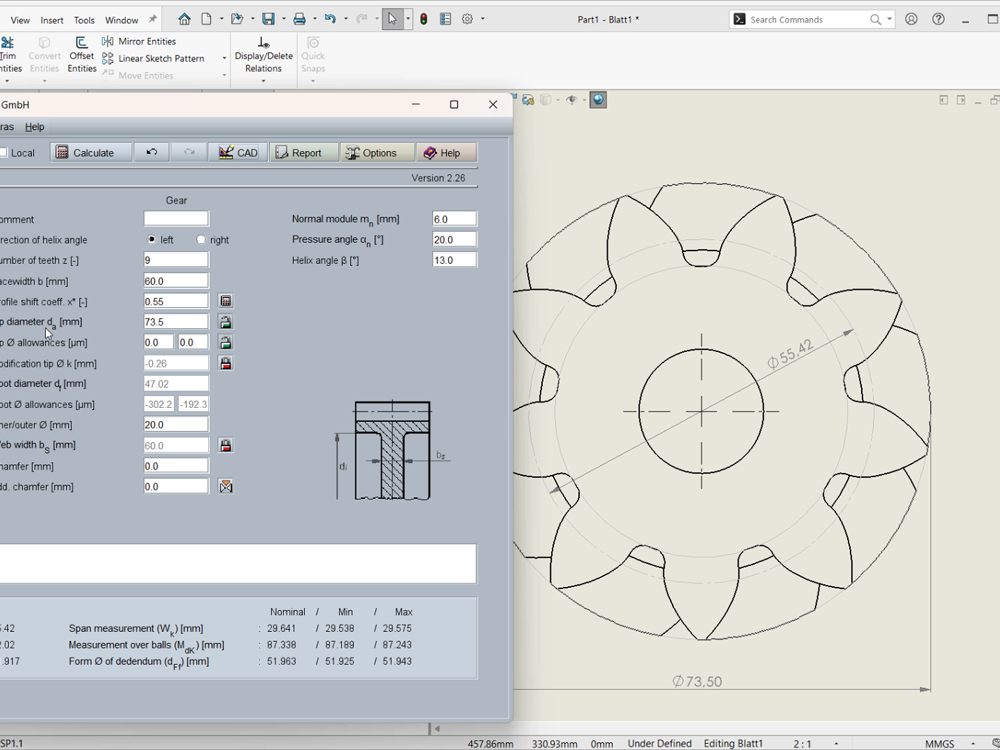
The latest generation of the TBK CAD plugin improves the transition from calculation to drawing in SOLIDWORKS.
When generating real 3D spur and helical gear models, based on calculation in TBK, additional reference surfaces are now automatically created: cylindrical surfaces for outer or tip, pitch and root diameters.
These surfaces can be directly selected in 2D drawing views derived from the 3D model.
For bevel gears, corresponding conical surfaces for face, pitch and root cones are generated.
Why This Makes a Difference?
In everyday design work, clean and reliable dimensioning is essential, especially when standard shortcuts no longer work.
Odd numbers of teeth or helical gears often make direct diameter dimensioning cumbersome in drawings. With the new reference surfaces, these dimensions can now be applied directly and robustly without auxiliary constructions or workaround geometry.
For example, the tip diameter can now be dimensioned directly and cleanly in the drawing view without workaround constructions.
A short video on LinkedIn shows the workflow from 3D modelling through selecting the additional surfaces to applying the dimensions, using a helical gear as an example.