



Engineering Tip: Configuration of manufacturing data tables for gears using AI
Customizing gear manufacturing data tables in SOLIDWORKS has never been more flexible and now it can be even faster. As already mentioned in previous posts, the templates for gear data tables in the TBK CAD plugin can be individually configured.
Configuration is carried out via a clearly structured, easy-to-understand XML file. For many users, adapting this XML file is straightforward. However, when faster workflows are required or manual trial-and-error should be avoided, AI can provide valuable support.
How does this work in practice?
Assume the following elements are already available:
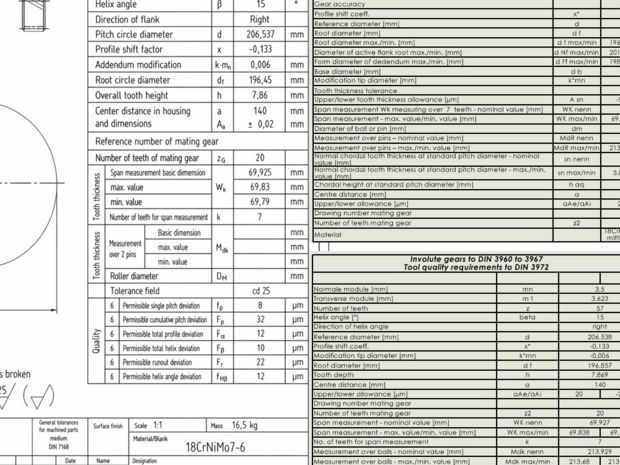
- A drawing with a manually created gear data table or
- A screenshot of that table
- The corresponding XML calculation file and
- The XML template file
These files, together with the screenshot, can be uploaded into an AI tool (e.g. ChatGPT), followed by the instruction:
„The XML template file is used to generate manufacturing data tables. The numerical values are taken from the TBK calculation file (.sgp). Adapt the XML template so that a table can be generated that is similar to the table shown in the screenshot. The format and functionality of the XML template should be retained.“
The AI then adapts the XML structure accordingly.
The implementation then takes just a few steps:
- Copy the updated XML template to the correct directory
- Test it in SOLIDWORKS
- Done
No manual restructuring. No guessing of tags. Just a faster workflow.
The example shown in the images demonstrates exactly this process, from an existing table to a newly generated and automatically structured manufacturing data table.
Engineering software becomes even more powerful when combined with intelligent tools.
Not as a replacement for engineering expertise, but as intelligent support.